Nike Evergreen PDP
Designed the Evergreen PDP — a dedicated PDP for discontinued products that reduces bounce rate and extends consumer browsing by surfacing relevant alternate products.
Role
Team
Commerce
Timeline
Skills
Research, Design
The Problem
When consumers navigate to a permanently discontinued product on Nike.com or the Nike App, they land on a 404 page — a generic disclaimer paired with a carousel of unrelated products. There's no explanation of what happened, no relevant context, and no clear path forward. The result is a dead-end experience with a 90% bounce rate, affecting 24 million consumers annually. The Evergreen PDP was designed to address this by answering two core questions: what context does a consumer need when arriving on a discontinued page, and what actions are they looking to take when the product they came for no longer exists?
Base PDP Structure
Using Nike's active PDP as a foundation, I audited and stripped out elements that would be irrelevant or non-functional for a non-purchasable, discontinued product — including the size selector, add to cart CTA, and shipping & returns details. This created a lean base structure to build the Evergreen PDP from.
Components & Research Insights
Through engineering feasibility assessments, three component opportunities were identified to communicate context around discontinued products and guide consumers toward meaningful next steps. To evaluate placement and design options for each component, I conducted a qualitative study of 13 1:1 sessions, 60 minutes each, in which participants explored prototypes of the Evergreen PDP with varying layouts and designs, providing feedback that directly shaped the final direction. The study was conducted with primarily runners and walkers of all experience levels as Nike has the most legacy products in that category.
Unavailable Messaging
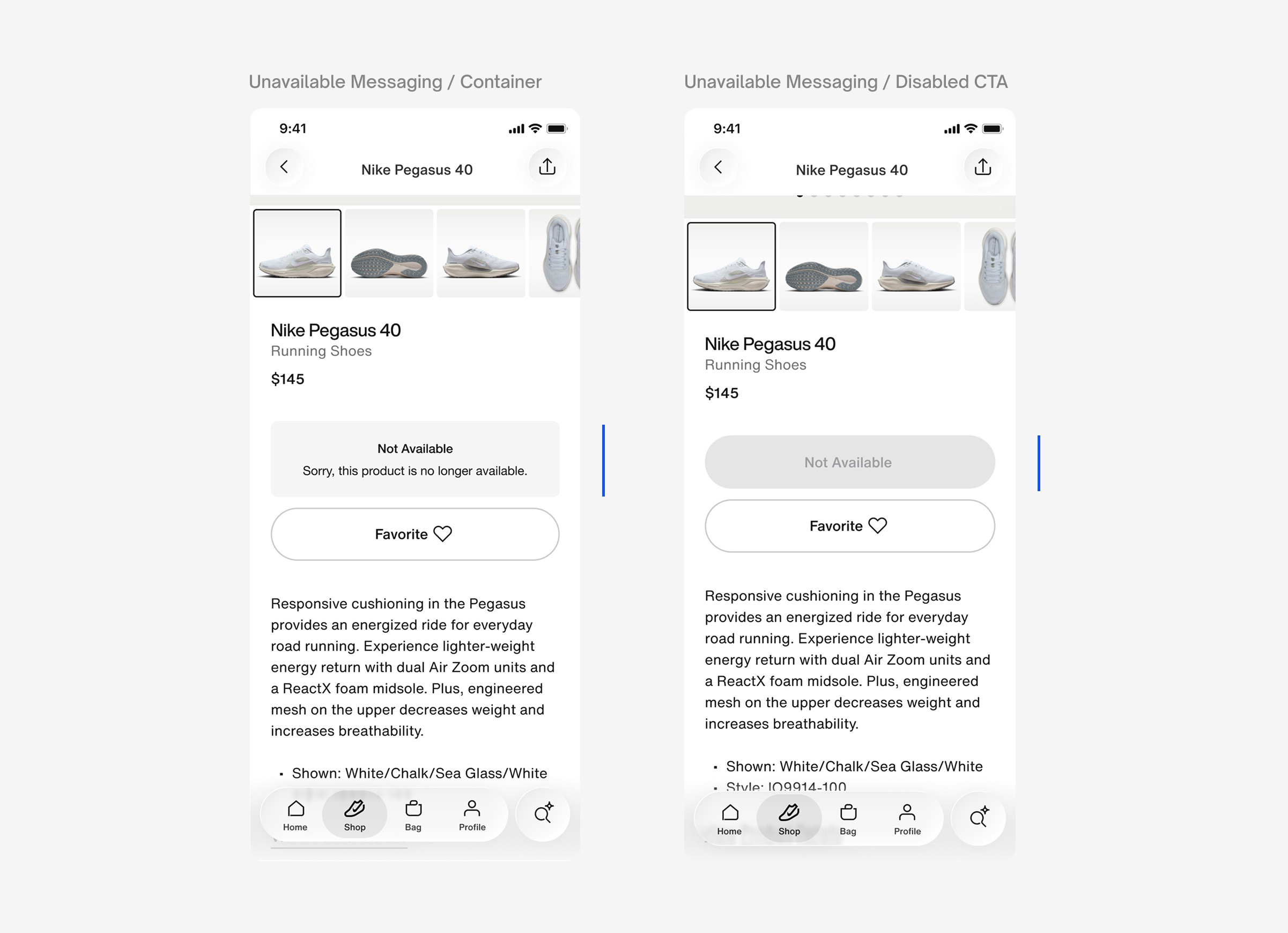
This component communicates the availability status of the product and sets clear expectations for consumers arriving on a discontinued page. Two design directions were tested: a container with a subline and a disabled CTA.
Research Insights
▪ Consumers needed more clarity around what "Not Available" meant — many were uncertain whether the product was permanently discontinued or temporarily out of stock. Several participants recommended using the word "Discontinued" explicitly to convey permanence and remove ambiguity.
New Version
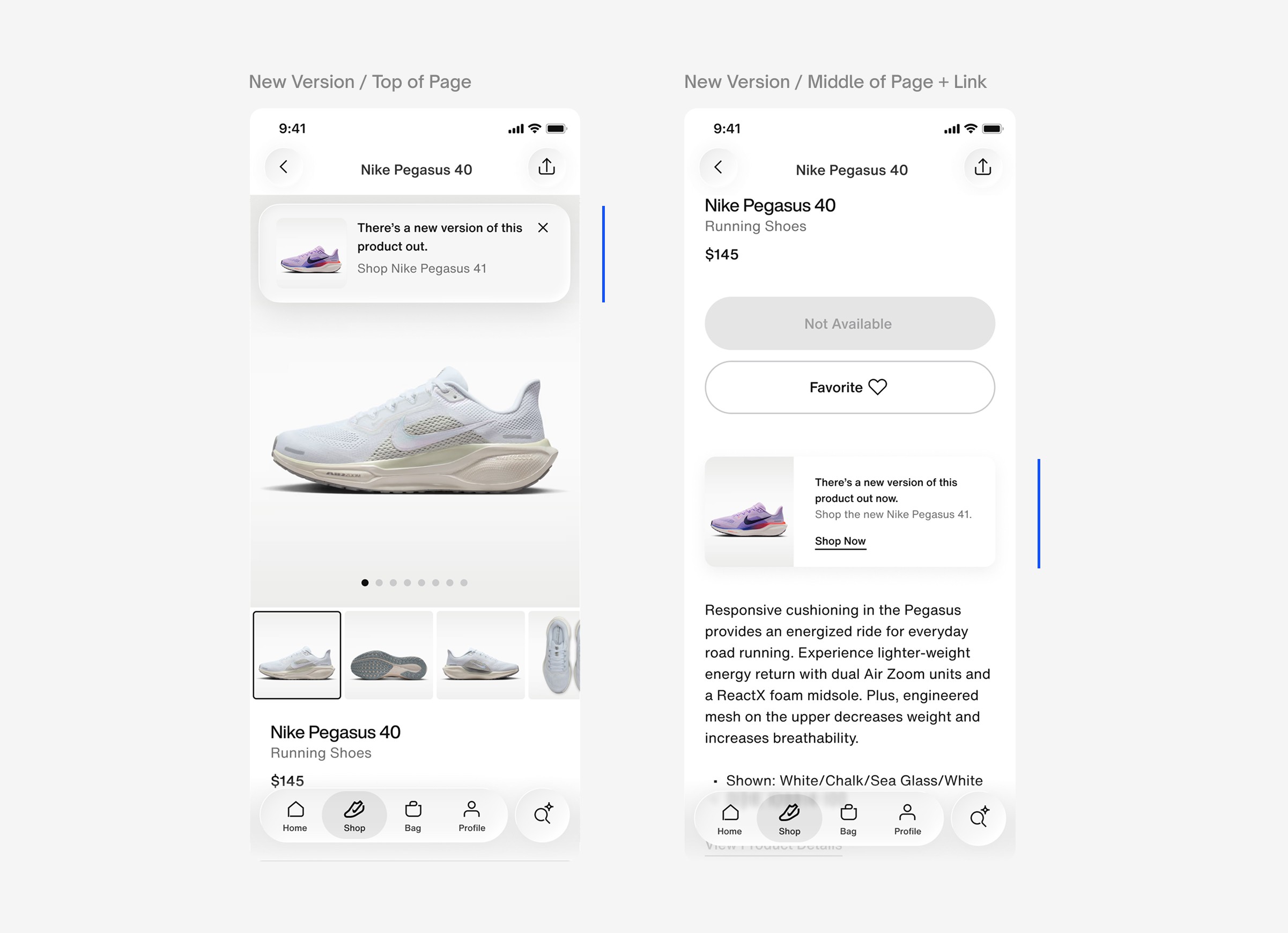
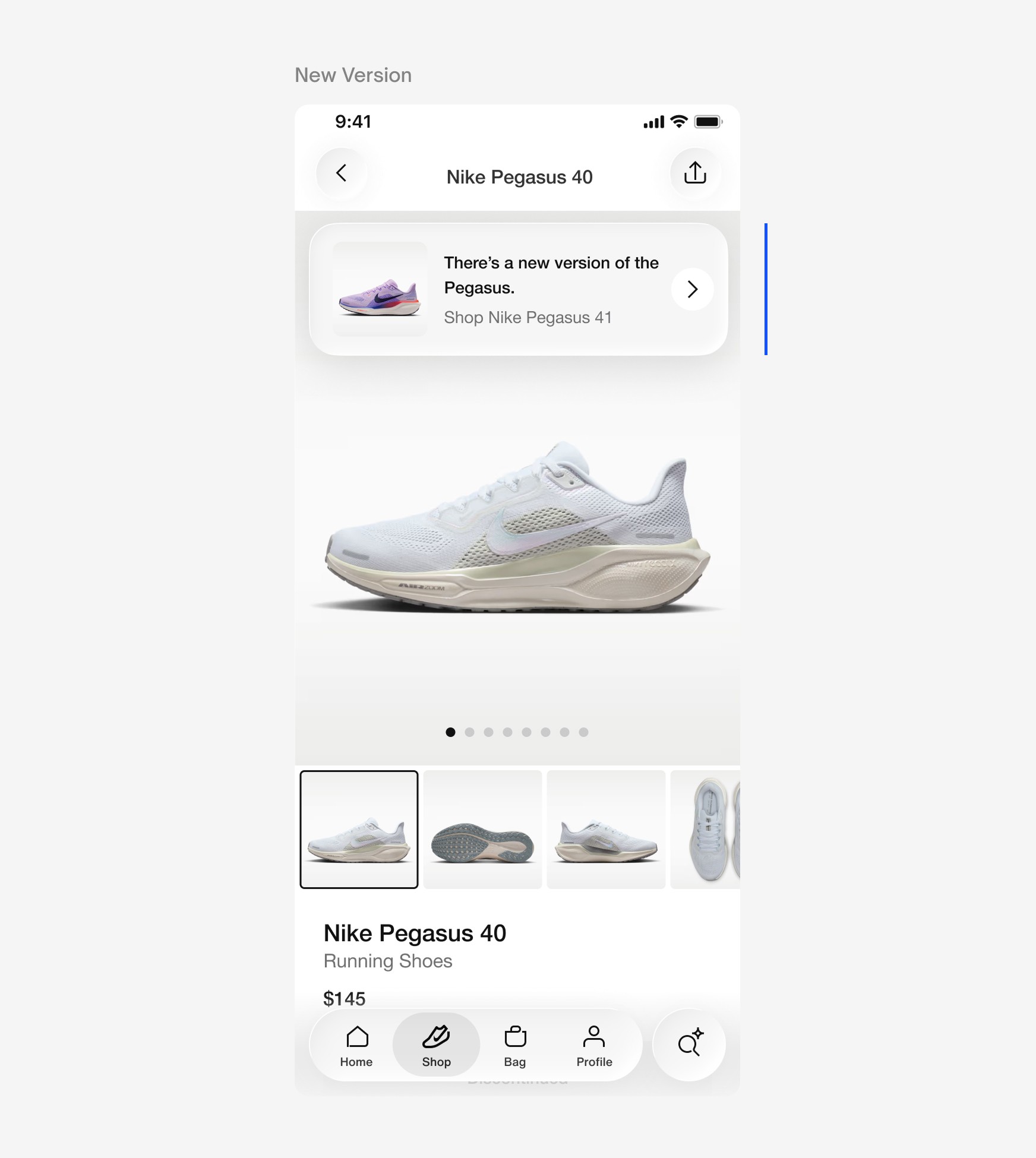
This component notifies consumers that a direct upgrade or newer version of the discontinued product exists, and links them to that product's PDP. Two placements were tested — a floating modal anchored at the top of the page and an inline modal below the Unavailable Messaging — along with two design variants: one with a link and one without.
Research Insights
▪ When consumers realize a product is discontinued, their first instinct is to seek out the newer version or find the product through an alternative retailer before exploring other options. Notably, consumers who are experienced runners were less likely to continue browsing altogether if their preferred product was unavailable, often preferring to wait or shop elsewhere rather than consider alternatives.
▪ Consumers universally favored having the floating modal at the top of the page as it was a persistent reminder of a direct substitute as they scroll, the inline placement felt too easy to miss.
▪ Some consumers felt that they would accidentally 'X' out of the floating modal at the top of the page as they would interpret it as an advertisement at first.
▪ Some consumers noted that the floating modal lacked a sense of interactivity compared to the inline design — without a visible link or CTA, it wasn't obvious the component was tappable and led to a new PDP.
Shop Similar
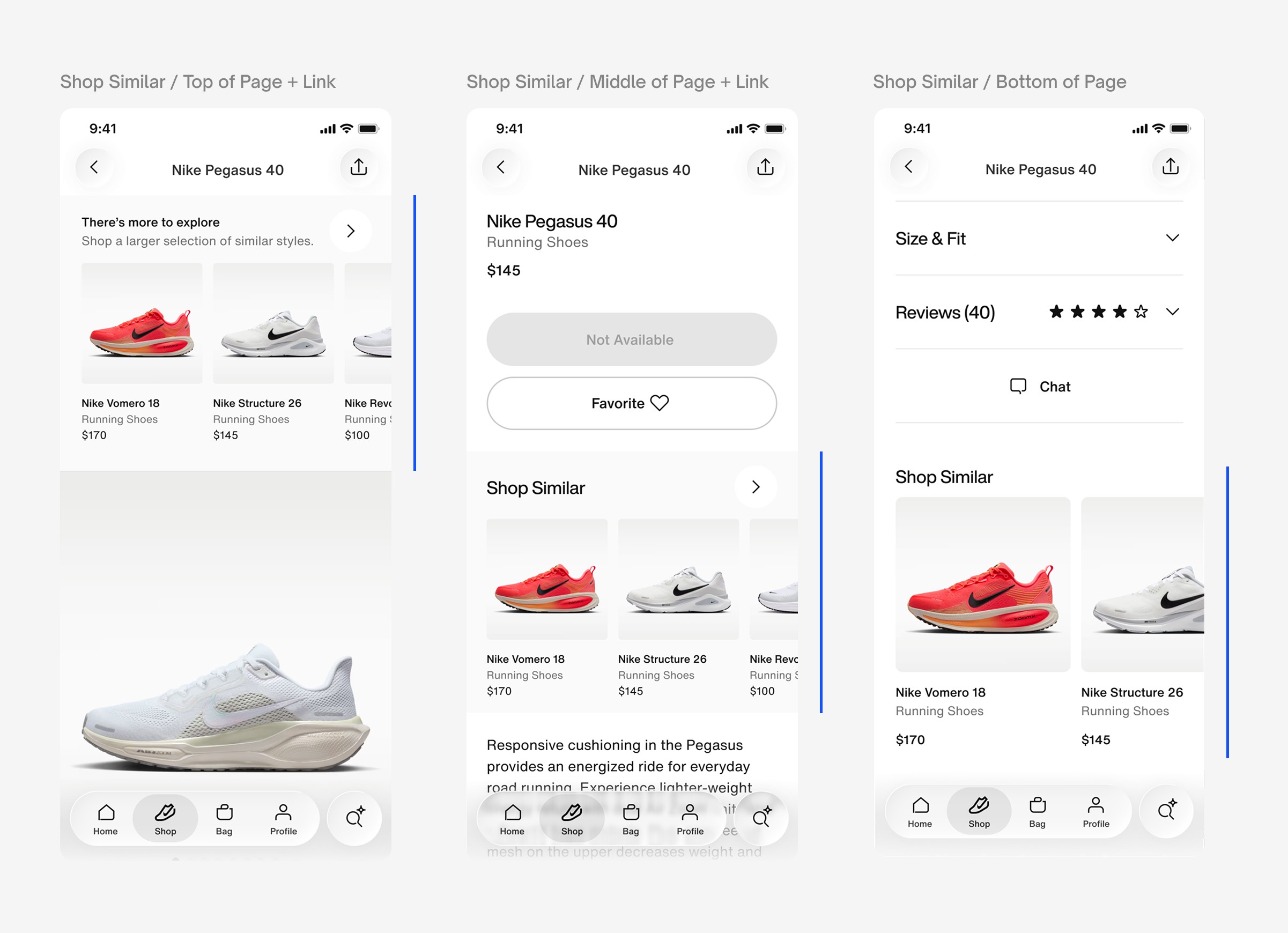
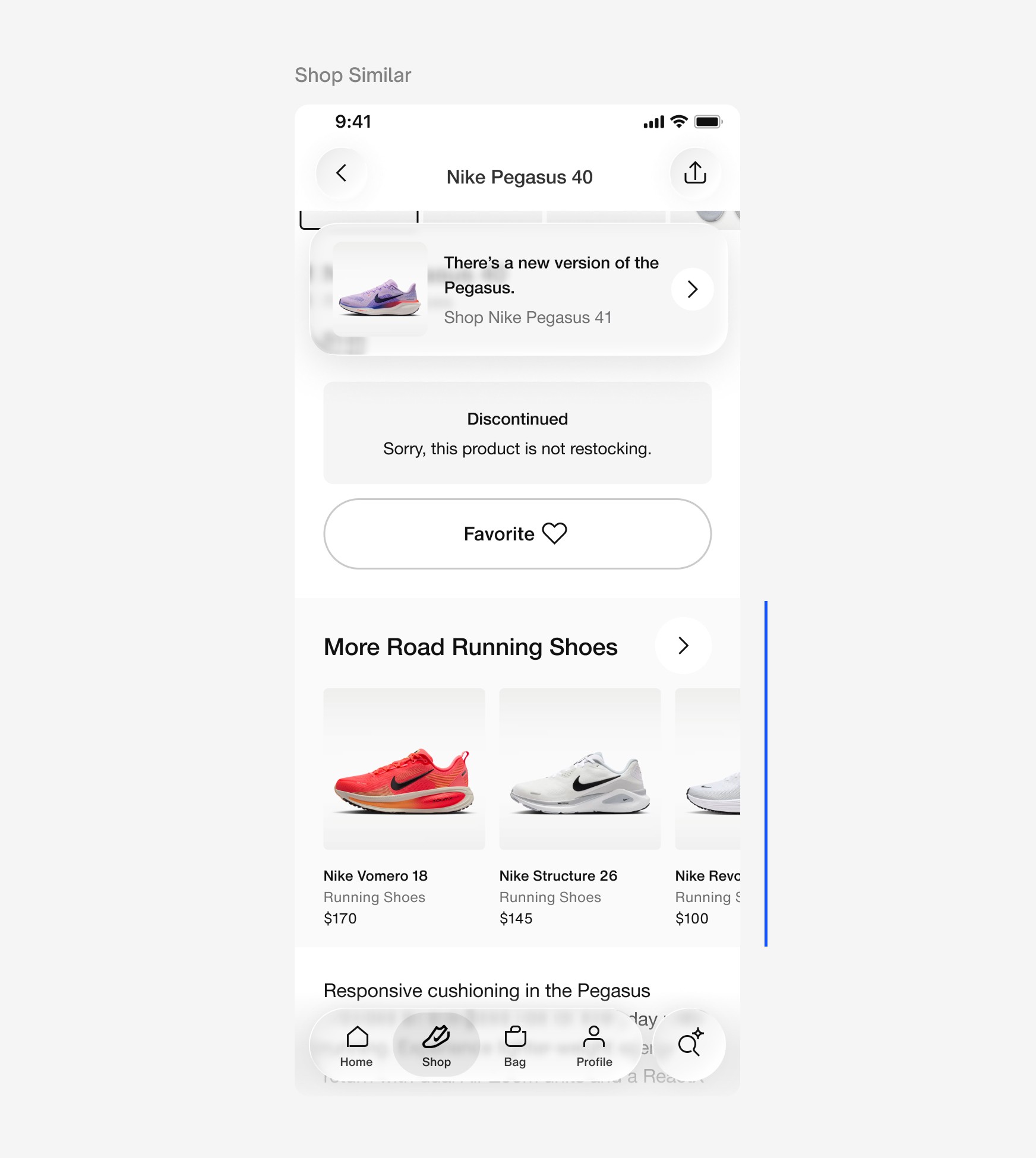
This component surfaces available alternatives to the discontinued product, serving consumers who are open to exploring other options. Using the discontinued product's category as a signal, it presents relevant substitutes — for example, surfacing other running shoes when a consumer lands on a discontinued running shoe. Three carousel placements were tested: anchored at the top of the page, inline, and at the bottom. Two design variants were also evaluated — a carousel alone and a carousel paired with a link to a full product wall of the same category.
Research Insights
▪ Consumers found the carousel overwhelming when anchored at the top of the page — encountering a wall of alternative products before understanding what happened to the item they came for felt jarring and premature.
▪ Consumers favored the inline placement, just below Unavailable Messaging. Consumers wanted to see alternative products only after the unavailability had been clearly communicated.
▪ The bottom of page placement felt familiar and consistent with other retail sites, but was functionally ineffective — most consumers wouldn't scroll that far once they realized the product they wanted was unavailable.
▪ Generic category-level product recommendations — such as all running shoes — felt too broad; consumers expected the carousel to reflect more specific attributes of the product they were shopping, like road running shoes rather than running shoes at large.
▪ Consumers wanted clearer context around how recommendations were being generated, favoring a descriptive title or sub line over a generic label like "Shop Similar" — for example, "More Road Running Shoes" was seen as more helpful and trust-building.
Final Design
Utilizing the research findings and aligning with PM's and engineering, we iterated on the components for delivery.
Unavailable Messaging
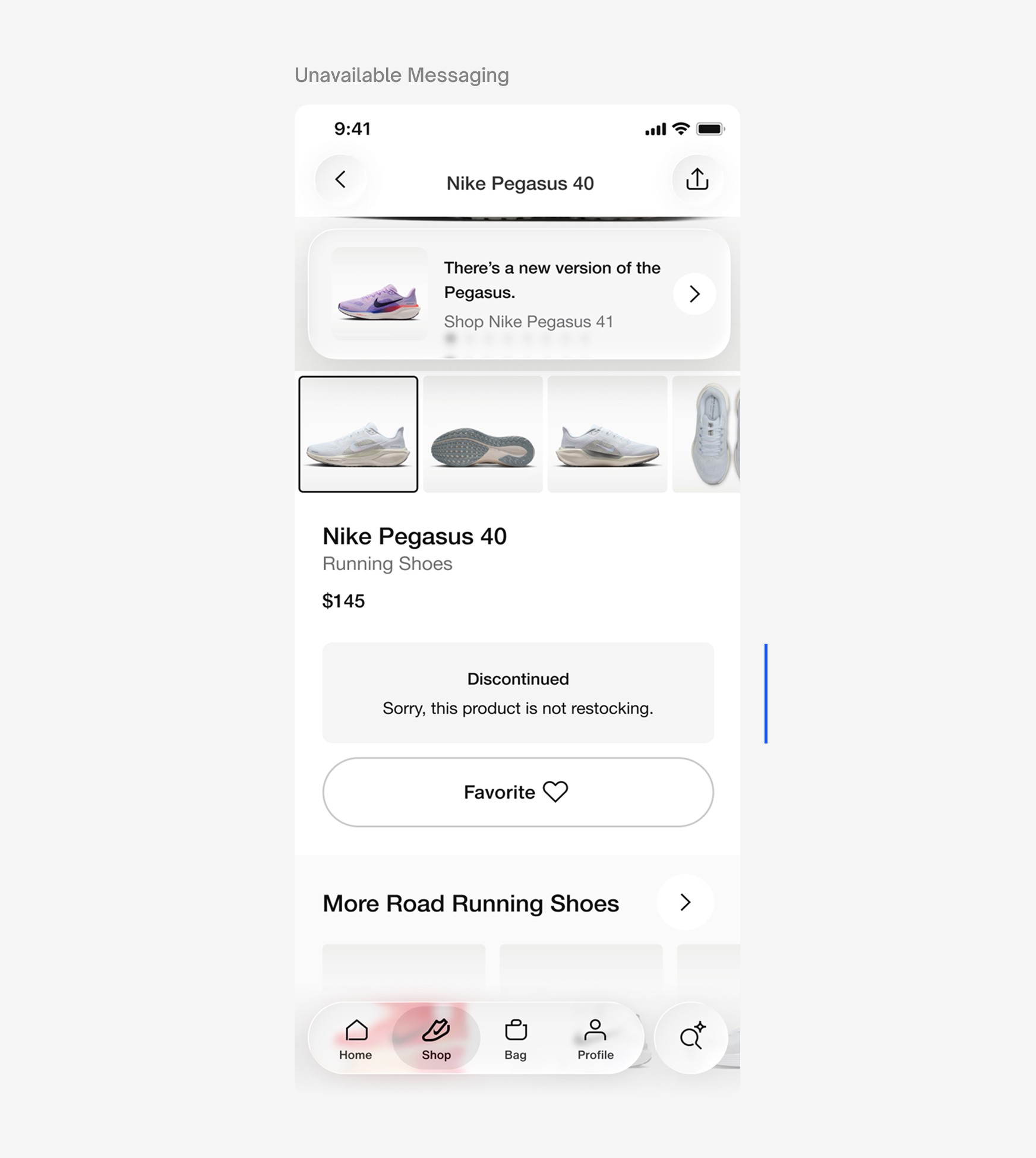
This component communicates the discontinued status of the product, supported by a subline of copy to provide additional context and clarity.
Design Recommendations
▪ Use "Discontinued" to describe and indicate permanency.
▪ Provide sub line for additional clarification on status of product.
New Version
The New Version component is a floating modal anchored at the top of the page, serving as a persistent reminder that a direct upgrade of the discontinued product exists as consumers scroll. The component directly links to the PDP of the new version indicated by a CTA.
Design Recommendations
▪ Remove 'X' from modal to reduce chance of accidental dismissal.
▪ Add CTA to indicate interactivity and link to PDP of new version.
Shop Similar
The Shop Similar recommendation algorithm and carousel were owned by a separate product and engineering team, limiting the scope of changes we could make to the product recommendations and carousel title within this project. Research insights were documented and shared as actionable suggestions for the owning team to inform future iterations of the algorithm and carousel.
Design Recommendations
▪ Replace the generic "Shop Similar" title with a contextually relevant label to the product recommendations — e.g. "More Road Running Shoes."
▪ Narrow product recommendations to the discontinued product's subcategory rather than a broad category — e.g. road running shoes instead of all running shoes.
Impact
Research findings and the final proposed design were socialized with product and engineering teams. While this project was not seen through to launch due to workforce reductions at Nike, the design and research foundation are in place to address a gap affecting 24 million consumers annually — with meaningful potential impact on bounce rate reduction and downstream conversion.